Building an age calculator in Julia is a practical way to learn the language’s Dates standard library. Julia provides Date for calendar dates, DateTime for dates with a time of day, and period types such as Year, Month, Week, and Day for calendar arithmetic.
This guide shows how to calculate completed age from a date of birth, calculate age on a fixed reference date, validate future dates, count elapsed days and weeks, parse date strings, handle leap years and February 29, and build reusable Julia functions for years-months-days output.
Quick answer
For a date-only age calculation, load Dates, obtain today’s date with today(), and compare the birthday with the current month and day:
using Dates

dob = Date(1990, 5, 17)
today_date = today()

age = year(today_date) - year(dob)
if (month(today_date), day(today_date)) < (month(dob), day(dob))
    age -= 1
end

println(age)
For a reusable calculator, pass the reference date as an argument instead of hard-coding today’s date. That makes historical calculations and automated tests deterministic.
Table of contents

Why use Julia Dates for an age calculator
Julia’s Dates standard library is designed for calendar-aware work. A Date represents a calendar date without a time of day, while DateTime includes a time component. For a normal birthday calculator, Date is the simpler and more appropriate type because age from a date of birth is normally a calendar calculation.
The Julia documentation also distinguishes calendar periods such as years and months from day-based periods. This matters when calculating an age in human-readable components because months do not all contain the same number of days.
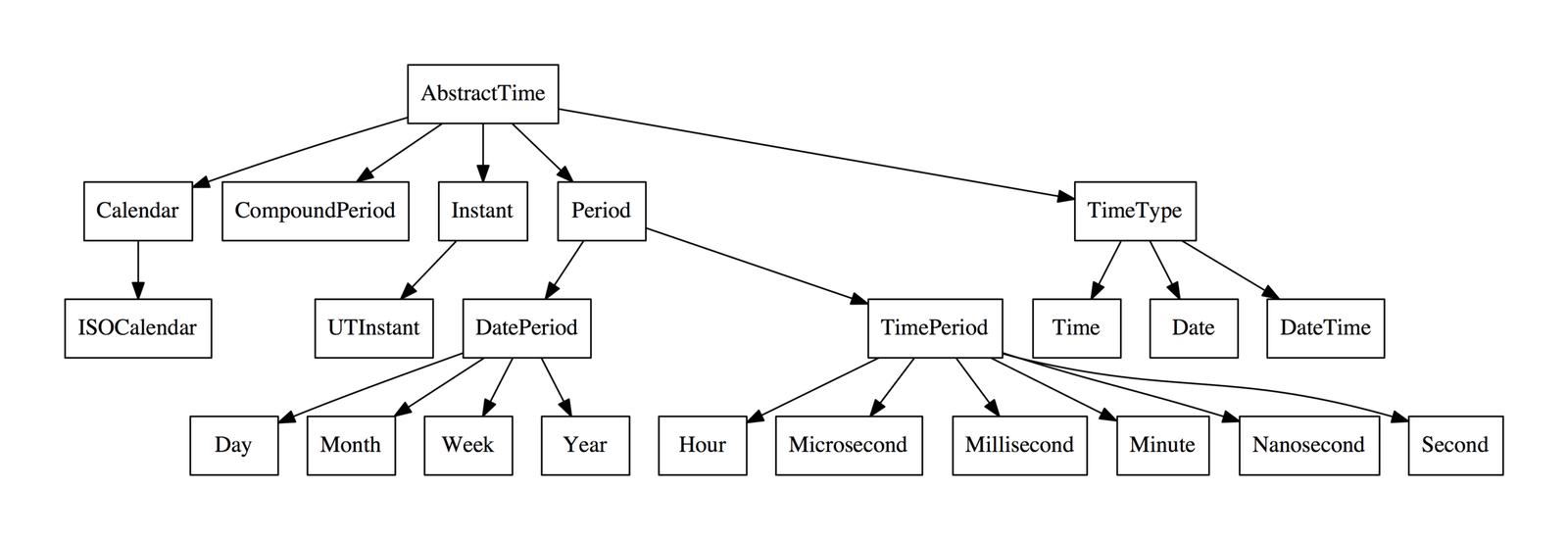
Julia date types and functions
| Julia function or type | Purpose |
|---|---|
Date | Represents a calendar date. |
DateTime | Represents a date and time of day. |
today() | Returns the current local calendar date. |
year() | Gets the year component. |
month() | Gets the month component. |
day() | Gets the day-of-month component. |
isleapyear() | Checks whether a date’s year is a leap year. |
daysinmonth() | Returns the number of days in a month. |
Year, Month, Week, Day | Calendar period types used in date arithmetic. |
The official Julia Dates documentation describes these date types, period arithmetic, parsing, formatting, and date adjustment behavior. Julia’s documentation is particularly useful for month arithmetic because changing a date by a month can require calendar-end adjustment.
Build a basic age calculator
Start with a function that accepts a date of birth and a reference date. The reference date can default to today, but keeping it as an argument makes the function reusable.
using Dates

function age_in_years(dob::Date, reference::Date=today())
    age = year(reference) - year(dob)

    if (month(reference), day(reference)) < (month(dob), day(dob))
        age -= 1
    end

    return age
end

dob = Date(1990, 5, 17)
println(age_in_years(dob))
The important detail is the birthday comparison. Simply subtracting the years would give the wrong result for someone whose birthday has not happened yet in the reference year.
Calculate age on a fixed date
A fixed reference date is useful when you need to reproduce an historical result, calculate age at an application cutoff date, or write deterministic tests.
dob = Date(1990, 5, 17)
reference = Date(2025, 1, 1)

println(age_in_years(dob, reference))
Using a fixed Date also prevents the answer from changing simply because the system clock moved to another day.
Validate the date of birth
A normal age calculator should reject a date of birth that is later than its reference date. Julia’s date values support ordinary comparisons, so validation can remain simple.
function valid_dob(dob::Date, reference::Date=today())
    return dob <= reference
end
When parsing user input, handle invalid date strings separately from valid dates that happen to be in the future. This produces clearer validation messages.
Calculate age in years, months and days
Years-months-days output is more involved than completed years because calendar months have different lengths. A practical approach is to calculate completed years first, advance the birth date by those years, then calculate complete months, and finally count the remaining days.
Julia’s period arithmetic is calendar-aware. In particular, month arithmetic can adjust dates at the end of shorter months. The Julia documentation uses January-to-February examples to illustrate why the order of period operations matters.
using Dates

function age_ymd(dob::Date, reference::Date)
    if dob > reference
        return nothing
    end

    years = year(reference) - year(dob)
    anniversary = dob + Year(years)

    if anniversary > reference
        years -= 1
        anniversary = dob + Year(years)
    end

    months = 0
    cursor = anniversary

    while true
        candidate = cursor + Month(1)
        if candidate > reference
            break
        end
        cursor = candidate
        months += 1
    end

    days = Dates.value(reference - cursor)
    return (years=years, months=months, days=days)
end

result = age_ymd(Date(1990, 5, 17), Date(2026, 9, 22))
println(result)
This approach deliberately follows Julia’s calendar-period behavior rather than pretending that every month has a fixed number of days. If your application needs a different convention for month-end birthdays, document that convention and test it.
Leap years and February 29
Leap years affect February birthdays and anniversary calculations. Julia provides isleapyear() to determine whether a year is a leap year.
using Dates

println(isleapyear(Date(2024, 1, 1)))  # true
println(isleapyear(Date(2025, 1, 1)))  # false
For someone born on February 29, a calculator must define the observed birthday in non-leap years. February 28 and March 1 are common application conventions. The important point is to choose a documented rule rather than letting an invalid anniversary date produce inconsistent results.
Calculate elapsed days and weeks
Julia makes date subtraction straightforward. Subtracting one Date from another gives a day-based period, which is useful when the user wants elapsed calendar days rather than completed years.
using Dates

dob = Date(1990, 5, 17)
reference = Date(2026, 9, 22)

elapsed = reference - dob
days = Dates.value(elapsed)

complete_weeks = days ÷ 7
remaining_days = days % 7

println(days)
println(complete_weeks)
println(remaining_days)
This is a calendar-day calculation. It should not be confused with dividing elapsed clock hours by 24, which is an instant-based calculation and can involve different time-zone rules.
Parse dates from strings
Forms and APIs commonly provide a date as text. Julia’s Date constructor can parse ISO-style date strings, and it also supports a format string for other layouts.
using Dates

dob = Date("1990-05-17")
println(dob)

custom = Date("17/05/1990", "dd/mm/yyyy")
println(custom)
Prefer an unambiguous input format such as ISO 8601 when you control the API or form. If users enter another format, validate and normalize it before performing age calculations.
Format dates for display
Keep dates as Date values while calculating and format them only at the presentation boundary. Julia’s Dates.format function accepts formatting patterns for producing strings.
using Dates

dob = Date(1990, 5, 17)
println(Dates.format(dob, "yyyy-mm-dd"))
println(Dates.format(dob, "dd/mm/yyyy"))
Date versus DateTime and time zones
Use Date when the input and output are calendar dates. A birthday such as 17 May 1990 does not require an hour, minute, or second.
Use DateTime when the business rule concerns an exact date and time. If an application converts a timestamp into a user’s local calendar date, establish its time-zone policy explicitly. For a normal date-of-birth calculator, introducing timestamps unnecessarily can make the implementation harder to reason about.
Reusable Julia age calculator module
A small module keeps the calendar logic independent from a web framework, command-line interface, notebook, or API layer.
module AgeCalculator

using Dates

export age_in_years, age_ymd, valid_dob

function valid_dob(dob::Date, reference::Date=today())
    dob <= reference
end

function age_in_years(dob::Date, reference::Date=today())
    dob > reference && throw(ArgumentError("date of birth is in the future"))

    age = year(reference) - year(dob)
    if (month(reference), day(reference)) < (month(dob), day(dob))
        age -= 1
    end

    age
end

function age_ymd(dob::Date, reference::Date=today())
    dob > reference && throw(ArgumentError("date of birth is in the future"))

    years = age_in_years(dob, reference)
    cursor = dob + Year(years)

    months = 0
    while cursor + Month(1) <= reference
        cursor += Month(1)
        months += 1
    end

    days = Dates.value(reference - cursor)
    (years=years, months=months, days=days)
end

end
The functions are deterministic when the reference date is supplied explicitly, which makes the module easy to reuse and test.
Testing the calculator
Test normal birthdays, birthdays that have not happened yet in the reference year, future dates, leap years, and month-end cases.
using Test
using Dates

@test age_in_years(Date(1990, 5, 17), Date(2026, 9, 22)) == 36
@test age_in_years(Date(1990, 12, 10), Date(2026, 9, 22)) == 35
@test valid_dob(Date(2030, 1, 1), Date(2026, 9, 22)) == false

result = age_ymd(Date(1990, 5, 17), Date(2026, 9, 22))
@test result.years == 36
Fixed dates are important in tests. If a test calls today() directly, the expected result can change when the calendar changes.
Common mistakes
| Mistake | Why it causes problems | Better approach |
|---|---|---|
| Subtracting only the years | Age is overstated before the birthday. | Compare month and day after subtracting years. |
| Accepting future DOBs | The calculator can return a negative or meaningless age. | Reject DOBs later than the reference date. |
| Treating every month as 30 days | Calendar months have different lengths. | Use Julia’s calendar period arithmetic. |
| Ignoring February 29 | Anniversary behavior becomes ambiguous in non-leap years. | Document a February 29 convention. |
| Using DateTime unnecessarily | Time zones and clock times add complexity to a date-only problem. | Use Date for birthdays. |
| Testing with today() | Tests become time-dependent. | Pass a fixed reference date. |
Julia compared with other languages
| Language | Main date approach | Age-calculator focus |
|---|---|---|
| Julia | Dates, Date, DateTime, and period types | Calendar arithmetic with typed periods |
| Elixir | Date and standard date/time modules | Immutable calendar values and explicit functions |
| Rust | Standard types plus date/time crates | Strong typing and explicit calendar arithmetic |
| Go | time.Time and time | Parsing, comparison and duration handling |
| Java | java.time | Rich calendar and temporal APIs |
| Python | datetime | Readable date arithmetic and parsing |
| Swift | Foundation calendar/date APIs | Calendar-aware application development |
For related implementations, see our guides for Elixir, Rust, Go, Java, Python, and Swift.
Frequently asked questions
How do I calculate age in Julia?
Use the Dates standard library, subtract the birth year from the reference year, and reduce the result by one when the birthday has not occurred yet. Pass a fixed reference Date when you need a reproducible result.
How do I get today’s date in Julia?
Load Dates and call today(). It returns the current calendar date, which is the appropriate input for many date-only age calculations.
Can Julia calculate age in years, months and days?
Yes. Calculate completed years first, then advance by complete calendar months, and use date subtraction for the remaining days. This avoids treating every month as a fixed number of days.
How does Julia handle adding months to dates?
Julia’s Dates period arithmetic is calendar-aware. Month operations can adjust dates when the target month does not contain the original day, so month-end cases should be tested when building an age calculator.
How should a Julia age calculator handle February 29?
Choose a rule for non-leap years, such as treating February 28 or March 1 as the observed birthday. Keep that rule explicit because it is an application convention rather than a universal age-calculation rule.
Should I use Date or DateTime?
Use Date when the input is a date of birth and the result is calendar age. Use DateTime when the calculation genuinely depends on a time of day or an exact instant.
Julia date and time references
- Julia Dates documentation — official reference for Date, DateTime, period arithmetic, parsing, formatting, and date operations.
- The Julia Programming Language — official Julia project website.
- Julia learning resources — official learning materials and documentation links.
Image credits
The Julia logo is sourced from Wikimedia Commons; the Commons file page identifies the official Julia Programming Language logo as public domain, while noting possible trademark considerations. The Date and DateTime illustration is also from the Julia programming-language category on Wikimedia Commons. Check the original Commons pages for the applicable source and licensing details before reusing the images elsewhere.
Final takeaway
An age calculator in Julia is easiest to maintain when it treats a birthday as a calendar date rather than converting everything into elapsed seconds. Use Date for date-only calculations, today() for the current date, calendar comparisons for completed years, and Julia’s Year, Month, and Day periods when you need human-readable components.
For reliable production code, validate future DOBs, define your February 29 convention, test month-end boundaries, and pass fixed reference dates in automated tests. The same reusable functions can then serve a Julia script, API, notebook, or larger application.